 KeyCodeNavigator
How to Keep Track of Lockbox Codes as a Real Estate Agent
Every agent has stood in a driveway with buyers on the porch, thumbing through the MLS app, then texts, then email, looking for a four-digit number. The listing agent sent it. You know they sent it. You just cannot find it.
Lockbox codes are a small problem that happens ten times a week. Here is a system that actually holds up, whether you run three listings or thirty showings a weekend.
Why codes get lost in the first place
The code for a property never arrives in one place. In a typical week you might get:
- A combination lockbox code in the private agent remarks on the MLS.
- A gate code in a text from the listing agent an hour before the showing.
- An alarm code in a follow-up email, with instructions about which panel.
- A garage keypad code the seller mentions on the phone.
Four codes, four channels, one property. Multiply by every showing on your schedule and you have a search problem, not a memory problem. The fix is to give every code a home tied to the property, not to the conversation it arrived in.
Rule 1: One card per property
Whatever tool you use, the unit of organization should be the property, not the day or the client. When a code comes in, it goes on that property's card immediately, with a one-line note about where it applies:
Lockbox 4471 — on the gas meter, left side Gate 2290# — press # after Alarm 1985 — panel in pantry, disarm within 60 sec
The note is the part most people skip, and it is the part that saves you at the door. "Which keypad?" is as common a question as "what's the code?"
Rule 2: Put the code where you will need it
You need the code at the property, standing outside the car, often with someone watching you. A spreadsheet at the office is useless there. A text thread is close, but it makes you scroll.
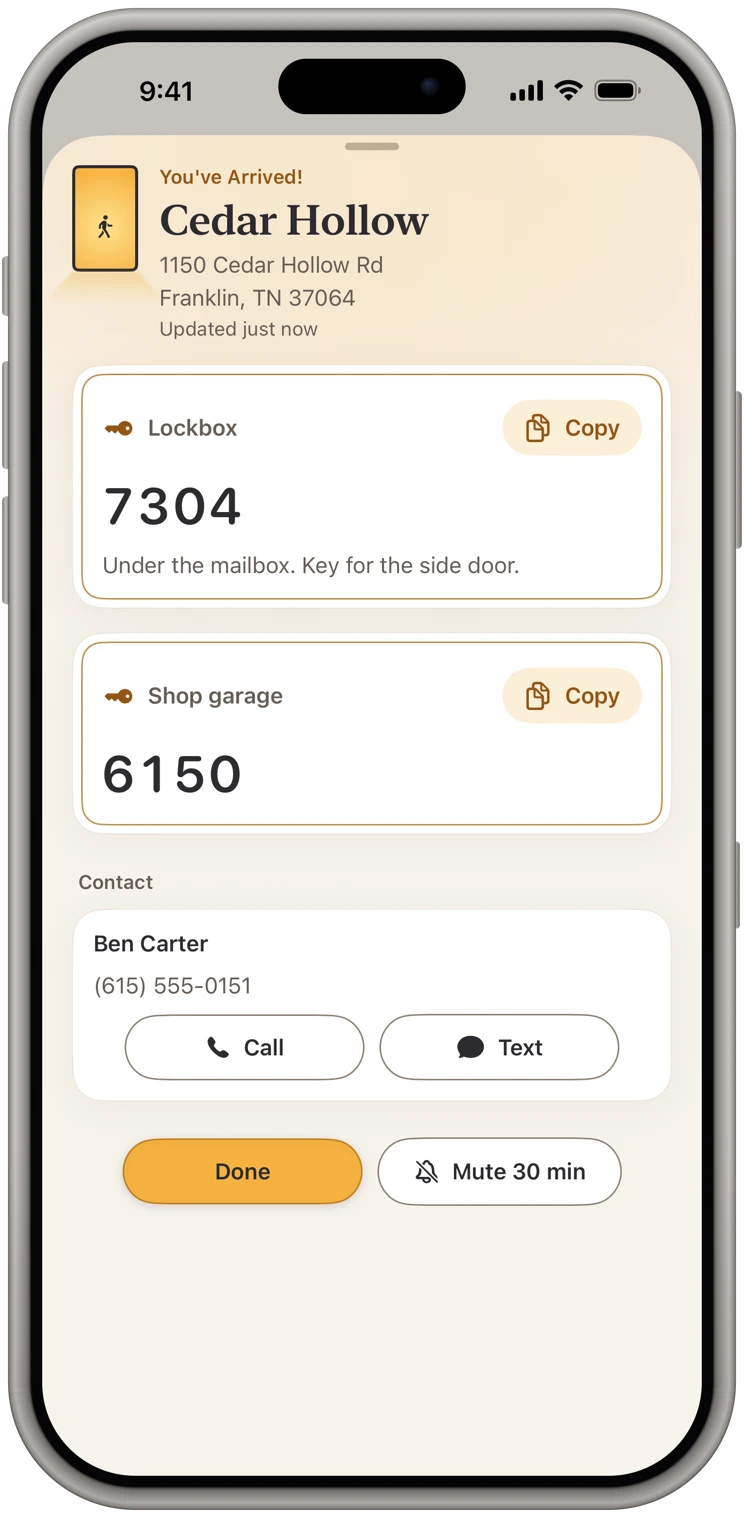
The best place for the code is on your phone's screen the moment you arrive. That is what KeyCodeNavigator does: you save the property once with its codes, and when you pull up, the app notices you have stopped there and puts the codes on screen, even if the app was closed. Nothing to open, nothing to search.
If you are not ready to use a dedicated app, the next best option is a locked note per property with the address as its title, so at least the search box finds it.
Rule 3: Separate showings from listings
Your own listings deserve a fuller card: lockbox, gate, alarm, garage, seller's phone, showing instructions, the neighbor's name if they are the one who complains about parking. You will be there many times.
Showings on other agents' listings are one-day affairs. Save the code, note the showing window, and clear it when you are done. Old codes for properties you no longer visit are clutter at best and a liability at worst.
Rule 4: Be careful how you share
You will be asked for codes by the buyer's agent, the inspector, the appraiser, the photographer and the stager. A few habits keep this from turning into a mess:
- Share one property at a time. Do not forward a screenshot of your whole list.
- Share it in a way you control, one place and one person at a time, rather than adding people to a shared document that lives forever.
- Make sure a change reaches them. A code sent in a message in March is still sitting in their thread in June.
KeyCodeNavigator's Share button does all three for you. You pick one person and the codes they get. They get a link, never a code: the place is sealed end to end, our server only passes it along and can't read it, and they add it free. When the code changes, their copy updates, and you can remove them when the deal closes. There's no shared account to manage.
Rule 5: Clean up after closing
When a listing closes, either delete it or move it to an archive with a "closed" note. The seller has moved on, the buyer has probably changed the codes, and the old number should not be one thumb-slip from being texted to someone.
This is easier when your codes live on your own phone rather than a shared cloud document. And when someone should no longer have a code, you remove them in one place, then change the code.
What about security?
Lockbox codes protect other people's homes. A few things worth knowing about where you keep them:
- Text threads are as secure as the weakest phone in the conversation, and SMS messages are not encrypted at all.
- Cloud notes and documents are convenient, and also mean the codes exist on a server you do not control.
- A dedicated app that stores codes on your device, behind Face ID, keeps the codes with you and with only the people you choose.
KeyCodeNavigator was built around that last idea. Your properties and codes are encrypted on your iPhone, locked behind Face ID or your own password. There's no account to create and no readable copy on our servers to breach. Your codes leave the phone only when you choose to share a place, sealed end to end: our server only passes it along and can't read it.
The short version
- One card per property, with a note on every code.
- Codes appear on your phone when you arrive, not in a document at the office.
- Keep listings and one-day showings separate.
- Share one property at a time, with one person.
- Delete codes after closing.
It takes about thirty seconds to save a property with its codes. You get that back the first time you do not have to scroll while a buyer waits.