 KeyCodeNavigator
How to Share the Lockbox Code and the Listing Documents With a Buyer's Agent in One Place
I used to stand in driveways with a stack of paper. One sheet per property: the cost-of-ownership summary, the upgrade list, the rental numbers, each with the lockbox code written across the top in pen. When a buyer's agent pulled up, the juggling started. Which sheet goes with this house? Is that a 7 or a 1? Hand it over, and hope it doesn't end up on the floor of their car.
I built KeyCodeNavigator to get rid of that stack. The idea was simple: put the code and the documents together on my phone, and hand them to the other agent without a single sheet changing hands.
The code and the pages that sell the property belong to the same place. They should arrive together, and they should both be on the phone in the agent's hand when the door opens. Here is how to set that up, whichever side of the deal you are on.
Why the selling documents never make it to the door
Listing agents work hard on the pages that sell a property. In a typical week the buyer's agent might get:
- The lockbox code in the private remarks or a text an hour before the showing.
- A cost-of-ownership sheet: taxes, insurance, HOA dues and average utility bills.
- A feature and upgrade list: the new roof, the tankless water heater, the whole-house generator.
- For a vacation property, rental numbers: last year's bookings and income, or a projection from a management company.
Every piece is useful, and every piece is somewhere else: an email, an open-house flyer, a shared folder. When the buyer asks what it costs to run the place, the agent is searching their inbox instead of answering.
Rule 1: Put the selling documents on the property
For a listing agent, the fix starts before anyone asks. When you take the listing, save it once with its codes, and attach the documents you want a buyer to see while they are standing in the house:
- What it costs to own: taxes, insurance, HOA dues, utilities
- What has been done to it: upgrades, with the year and the cost where you have them
- What makes it special: a feature sheet, the sprinkler and smart-home details
- For short-term rentals: the actual rental income, or a projection clearly marked as one
In KeyCodeNavigator, each property has its own Documents section. You add files from the Files app, from Photos, by scanning paper with the camera, or by pasting. They are stored with that property and nowhere else, encrypted on your iPhone.
Rule 2: Share the code and the documents together
When a buyer's agent books a showing, send them the property, not a pile of messages. Tap Share on the property, type their name, and pick what they get. The codes start selected. You tap the documents you want them to have, so the rental numbers and the upgrade list go, and the seller's own paperwork stays home.
They get one link by text or email. The message holds only the link, never the code or the files. The link works for one person: once they add it, it opens on no other phone, so a forwarded text gets nobody in.
Rule 3: Keep it current without resending
Listings change. The seller resets the alarm code, another month of bookings comes in, the HOA announces next year's dues.
When you change a code, every agent you shared the property with gets the new one, with no new message to send. When you add a document, the app asks who should get it. Nobody quotes rental numbers from a sheet three months old.
Rule 4: Take it back when the showing is over
A buyer's agent needs the property for a showing or two. You can set access to end on its own at a date and time when you share, or remove the agent later from the property's Shared with list. When the listing closes and you delete the property, it comes off the phones you shared it with too, unless you choose to let them keep a copy. Then change the code, as you would anyway.
What the buyer's agent sees at the door
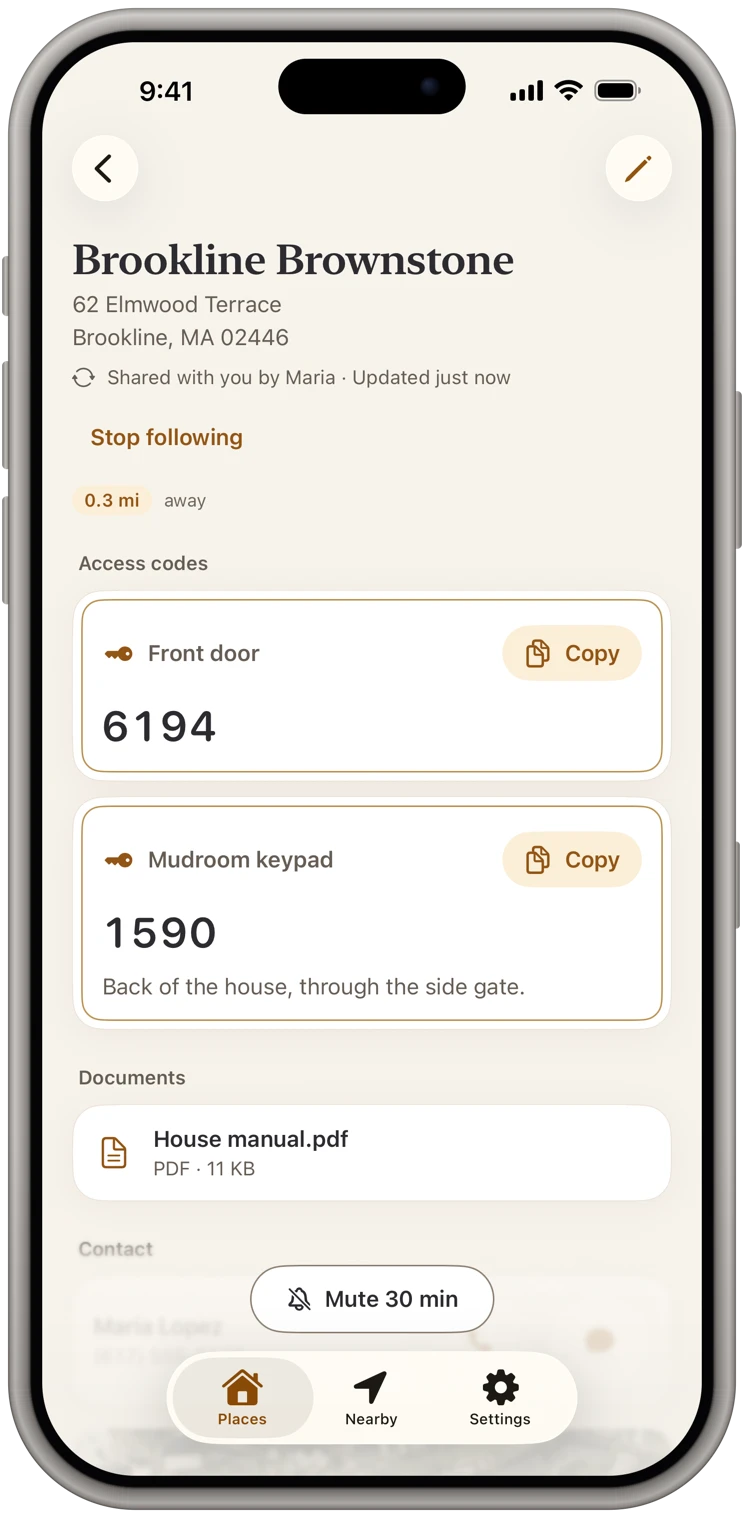
The buyer's agent taps the link, adds the property, and it sits in their list with everything the listing agent chose to send.
At the door, they open the property. The lockbox code is at the top with a Copy button. The cost-of-ownership sheet, the upgrade list and the rental numbers are right below it. When an investor asks what the condo earned last summer, the agent opens the sheet and hands them the phone. When an out-of-state buyer asks about the power bill, the answer is one tap away.
Answering in the room keeps the buyers' excitement going. Answering by email that evening usually doesn't.
One aside: formal disclosures, surveys and anything the buyer has to sign still go through your brokerage's required delivery process. This is for the documents you want shown on site.
Free for the agent on the other end
The buyer's agent pays nothing to receive a shared property. There is no account to create and no subscription. They install the app, add the link, and it is theirs, kept up to date, behind their own Face ID. Receiving stays free for good.
That is also how most agents find KeyCodeNavigator. They get a property from a listing agent who uses it, walk into the showing with the code and the numbers already on their phone, and then want the same thing for their own listings. When they do, there is a 14-day free trial.
What about security?
Lockbox codes protect a seller's home, and rental income is the seller's business. Neither belongs in a dozen inboxes.
KeyCodeNavigator keeps your properties, codes and documents encrypted on your iPhone, locked with Face ID or your passcode. When you share a property, it is sealed end to end on your phone: our server only passes it along and can't read it, and it holds it only until the other phone has it. The agent who receives it can't share it on. And you can remove them at any time.
The short version
- Attach the cost-of-ownership sheet, the upgrade list and, for rentals, the income numbers to the property.
- Share the code and the documents together, to one agent, through one link.
- Change a code or add a document once, and it reaches the agents who should have it.
- End access when the showing is over, and change the code after closing.
- Buyer's agents receive it free, with no account.
No stack of paper, no code written in pen. Just the code that opens the door, and the pages that sell the house one tap below it.